

Personal Data Protection
We’re here to support you.
Here’s what you should do in situations involving personal data protection and when to contact the NUS Personal Data Protection (PDP) Unit.
PDPC Contacts You
Cloud Services
Data Sharing
Trainings
Data Loss or Data Leakage
Personal Data Service Request
Do-Not-Call Registry
What should you do when you need to do personal data sharing with a third party?
What should you do when you need to conduct personal data protection training for the NUS community?
What should you do when you receive access, correction and/or withdrawal requests?
Data Sharing
Answer:
Before sharing any personal data (e.g., names, emails, IDs, medical info) with an external parties:Training
PDPA training is recommended in the following:
The materials are available in the Risk Academy Training Portal: https://ormc.nus.edu.sg/training/risk-academy/
Personal Data Service Request
If your department or unit already has a process in place to handle these requests, you should continue to use it.
Examples
You only need to refer the case to ORMC by directing them to Personal Data Service Request (PSR): https://myaces.nus.edu.sg/PSR/index.do form if:
Still unsure? Email dpo@nus.edu.sg.
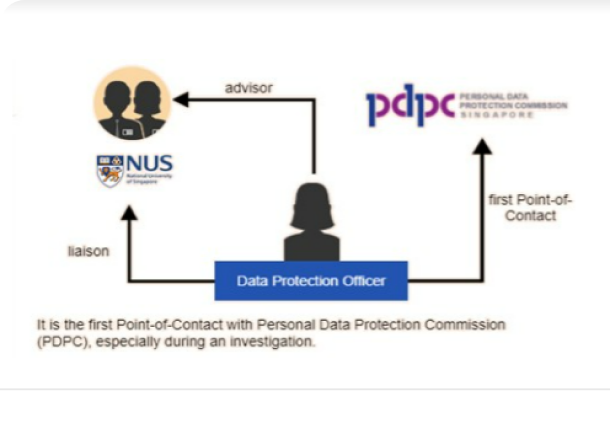
What to do when the Singapore Personal Data Protection Commission (PDPC) contacts you?
What to do when there is a data breach, data loss or data leakage of University data?
What should you do when you want to conduct telemarketing, telephone fundraising or a telephone survey?
What should you do when you want to subscribe to a cloud service from a third party?
Personal Data Protection Commission (PDPC) Contacts You
If you receive any communication from the Personal Data Protection Commission (PDPC) — whether by email, letter, or phone — do not respond directly.
Instead, you must immediately email to DPO email inbox at dpo@nus.edu.sg.
ORMC will advise on the appropriate next steps and coordinate the official response with PDPC, if needed.
Why this matters:
PDPC matters often involve legal, regulatory, or reputational implications. A coordinated response helps protect the University and ensures accurate, timely handling.
Data Loss or Data Leakage
If any University data is lost, leaked, or accessed without authorisation, take action immediately.
Step 1: Lost or stolen device
If a device or portable storage containing University data is lost:
Complete the Data Breach Report.
Tip: Early reporting helps reduce risk and ensures timely response. Even if you're unsure, reach out to dpo@nus.edu.sg for guidance.
Do-Not-Call Registry
Before making calls or sending SMSes to individuals for marketing, outreach, surveys, or fundraising, you must ensure compliance with Singapore’s Do-Not-Call (DNC) provisions under the PDPA.
Start by reading the official NUS DNC Policy: NUS Do-Not-Call (DNC) Policy.
Applies to:
If unsure, check with dpo@nus.edu.sg before proceeding.
Cloud Services
Before using any third-party cloud service (e.g. apps, survey tools, AI platforms), you must check if a Cloud Service Provider (CSP) assessment is required.
Submit or check your CSP assessment via the NUS Cloud Assessment Portal.
If you’re in doubt or unsure how to classify your use case, email the Cloud Team at NUSITCloudPolicy@nus.edu.sg for guidance.
What should I do if I'm accessing or storing personal data on my laptop or phone while working or studying remotely?"
What should be check before emailing documents such as spreadsheets, forms contain personal data, or medical info/records?
What should be done before taking or using images of students/staff at events?
How should you handle third-party contracts that include personal data clauses?
Use of Personal Devices (BYOD)
Using Personal Devices (BYOD)
If you're using your own laptop, tablet, or mobile device for NUS-related work, study, or remote access that involves personal data, your device must meet the following requirements to be eligible for use in NUS:Refer to the official policy: NUS Bring-Your-Own-Device (BYOD) Policy.
This applies to:If unsure, contact itcare@nus.edu.sg for assistance.
Emailing Personal Data
Whether you're a staff member, PI, or student, emailing personal data requires care.
Before sending:
Need help? Email dpo@nus.edu.sg.
Photo & Video Consent
Before taking or using photos/videos at any NUS event:
Questions? Email dpo@nus.edu.sg.
Third-Party Vendors & Contracts
All third-party contracts must include the necessary data-protection clauses, such as:
What must be done when collecting personal data through approved surveys or interview?
What are your responsibilities if you’re reviewing user access to systems holding personal data?
What to do with personal data you've handled when you leave or move roles?
What should I do when working remotely or accessing personal data off-campus?
Research & Surveys
If you’re collecting personal data through research or surveys, follow PDPA requirements to keep participant data safe.
Key steps:
Still unsure? Contact dpo@nus.edu.sg.
Access Logs & Monitoring
Adhere to these responsibilities if you’re staff or student reviewing or handling access to systems or platforms that hold personal data:
Leaving the University / Role Change
When you leave NUS, graduate, or move to a new role:
Remote Work & Offsite Access
When working remotely or accessing NUS data off-campus, take extra steps to protect personal and confidential information.
Good practices:
If unsure, Contact itcare@nus.edu.sg or dpo@nus.edu.sg.
What should I do?
What should I take note when I am collecting personal data using collaboration tools or shared drive ( e.g, MS Forms)
Handling Event or Participant Data
When running a student event, camp, survey, or workshop, you must handle participant data responsibly.
Follow these steps:
If unsure, Contact your staff advisor or DPO dpo@nus.edu.sg
Collaboration Tools & Shared Drives
Collaboration tools are convenient, but incorrect settings can expose personal data. Always check before sharing.
Good practices:
If unsure, contact Staff Advisors, PIs or DPO dpo@nus.edu.sg to confirm correct sharing settings.
What to do when the Singapore Personal Data Protection Commission (PDPC) contacts you?
Contact the NUS Personal Data Protection Unit (PDP Unit) if contacted by the Singapore Personal Data Protection Commission (PDPC)
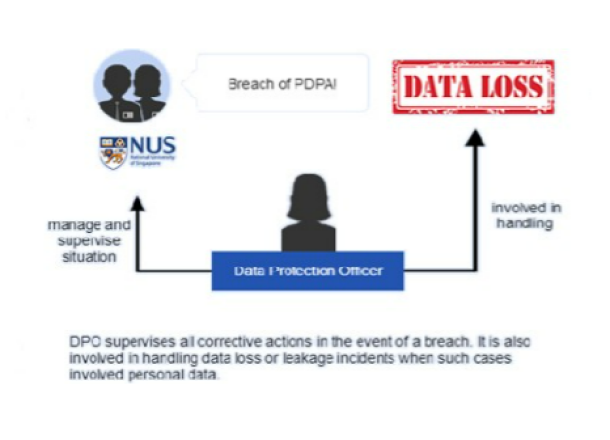
What to do when there is a data breach, data loss or data leakage of University data?
1. For any lost or stolen devices or portable storage containing University data, make a reasonable effort to locate the lost or stolen item(s). If the item(s) is/are still not found, then file a police report.
Next, contact NUS IT Care and your respective department manager, and follow the NUS IT Security Incidents Reporting process.
2. For incidents involving personal data, please report to NUS Data Protection team by completing the Data Breach Report and emailing the same to dpo@nus.edu.sg

Other than NUS IT Care and your respective department manager, please contact the NUS PDP Unit, if personal data are involved. The PDP Unit will help you to assess the impact of the incident and advise on whether further actions will need to be taken, such as:
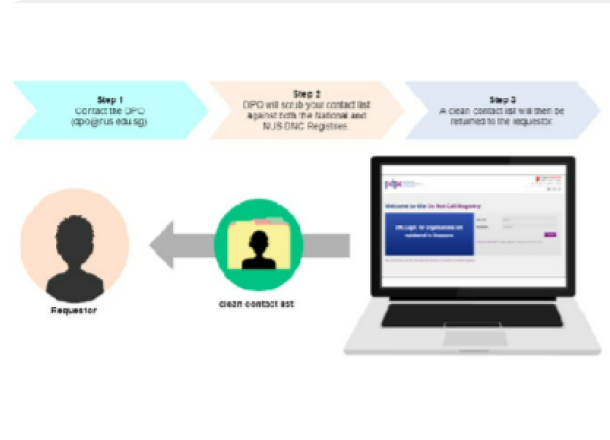
What should you do when you want to conduct telemarketing, telephone fundraising or a telephone survey?
Contact the NUS Personal Data Protection Unit (PDP Unit) for further consultation and if necessary we will scrub the telephone list against the National and NUS Do-Not-Call Registries.

What should you do when you want to subscribe to a cloud service from a third party?
First, visit the NUS IT Cloud Policy Sharepoint for more details on what you need to do to complete a Cloud Service Provider (CSP) assessment on the cloud service that you have in mind before subscription. You can also write to NUS IT at NUS IT Cloud Policy at NUSITCloudPolicy@nus.edu.sg to ask for more details.
Contact the NUS PDP Unit, if personal data will be involved in the subscription. We will help you to evaluate various considerations in the CSP assessment, such as:

What should you do when you need to do personal data sharing with a third party?
First, visit the NUS IT Cloud Policy Sharepoint for more details on what you need to do to complete a Cloud Service Provider (CSP) assessment on the cloud service that you have in mind before subscription. You can also write to NUS IT at NUS IT Cloud Policy at NUSITCloudPolicy@nus.edu.sg to ask for more details.
Contact the NUS PDP Unit, if personal data will be involved in the data sharing with the third party. We will help you to evaluate whether:

What should you do when you need to conduct personal data protection training for the NUS community?
1. Ongoing online e-Learning is available:
- Visit the LumiNUS page and look for the e-module under the University Policies and Guidelines package.
2. To learn more about Singapore PDPA:
-Complete the Eight Personal Data Protection Commission (PDPC)
e-Learning modules at https://www.pdpc.gov.sg/Resources/E-learning-Programme
3. Contact the NUS Personal Data Protection Unit (PDP Unit) if you want to conduct a customised face-to-face training on personal data protection matters.
What should you do when you receive access, correction and/or withdrawal results?
For efficiency and effectiveness, if you have already set up a facility or function to handle access, correction and/or withdrawal requests of your administration process, please continue to do so to service these requests.
Example 1 : If you have set up a mailing list with an unsubscribe function, please continue to use that to handle unsubscription requests.
Example 2 : If you have provided contact points for the participants of your event on registration, changes and withdrawals, please keep the current practice.
Note: the NUS Personal Data Protection Unit also has a Personal Data Service Request (PSR) system which handles general requests from members of the public.